


EZ Rec



EZ Rec
Digital Piano Recording Tool
Record Your Digital Piano Easily and in High-Quality Sound.
A Recording & Video App Designed for Use with KORG PianoRec
KORG EZ Rec is an iOS app that, when used with KORG PianoRec, makes recording audio and video of your digital piano performances incredibly simple. With its easy-to-use interface, you can capture high-quality audio and video effortlessly and share them instantly – perfect for practice logs and social media posts.
|
|
Effortless High-Quality Stereo RecordingBy pairing with KORG PianoRec, EZ Rec allows you to record high-quality audio and video of your piano performances with high-quality sound directly on your iPhone. Its intuitive operation makes it easy for anyone to use. |
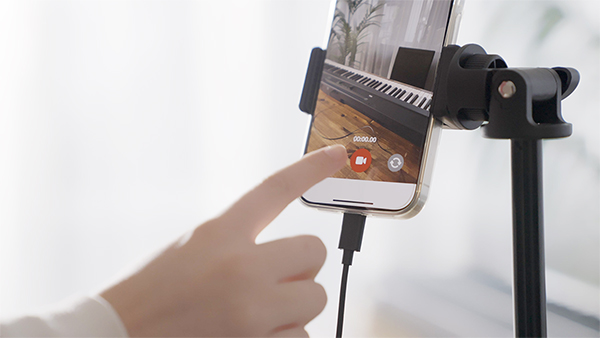
All-in-One Audio & Video Recording Solution
EZ Rec enables both audio and video recording within a single app, eliminating the need to switch between your camera app and voice memos.

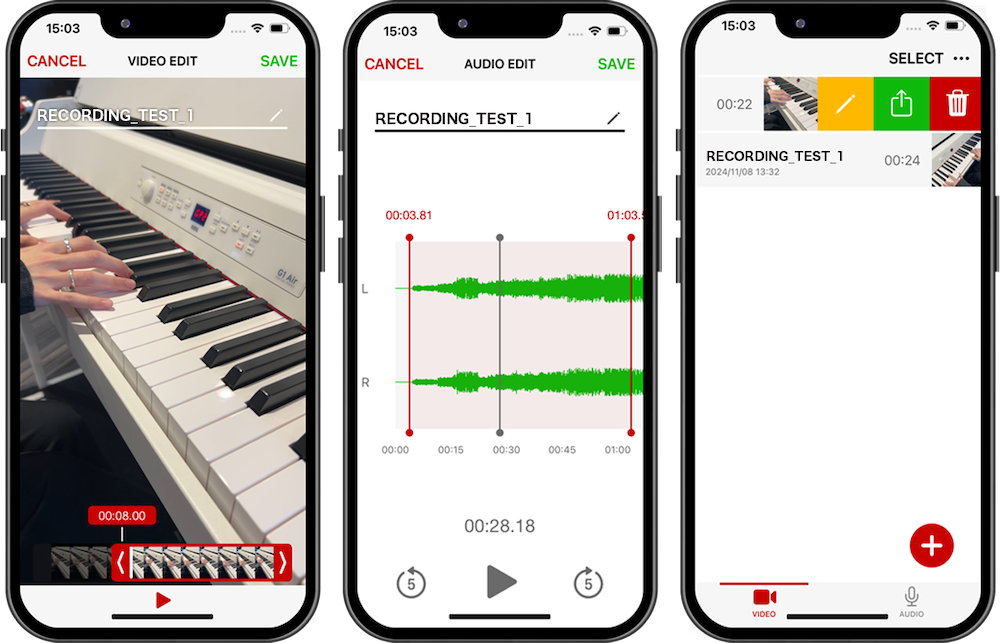
Simple Editing & Sharing Features
After recording or filming, you can edit your videos directly within EZ Rec. With just a tap of the "Share" button, you can easily upload your content to social media, send it to friends, or save it to your camera roll.
Ad-Free, Stress-Free ExperienceEnjoy a clean, ad-free interface that lets you focus entirely on recording audio and video. |
|

Ad-Free, Stress-Free Experience
Enjoy a clean, ad-free interface that lets you focus entirely on recording audio and video.
Important Notes
To use EZ Rec with PianoRec on iPhones with a Lightning port, you will need to purchase an Apple Lightning to USB 3 Camera Adapter separately.
After connecting PianoRec to your iPhone, it may take a few seconds for EZ Rec to recognize the device. If it is not recognized, please check the connection.
EZ Rec can also be used with the iPhone’s built-in microphone, but without PianoRec, recordings will be in mono instead of stereo.
EZ Rec
Digital Piano Recording Tool